2.0 Securing a Web-Based RDP Session
Secure and monitor privilege RDP access, without the need of agent or client application on the target machine.
Let us assume, an organization Intech Data, Inc. wants to secure and monitor employees’ action during the privileged access to Windows Server that is located in the network lab. This Windows Server contains confidential data.
Employees can access this server without using the remote desktop client. A few employees can access it remotely only during the business hours (9 AM to 6 PM) on business days (Monday to Friday).
This example refers to the following user profiles:
-
Markus: An database administrator of Intech Data, Inc.
-
Albert Jones: An employee of Intech Data, Inc.
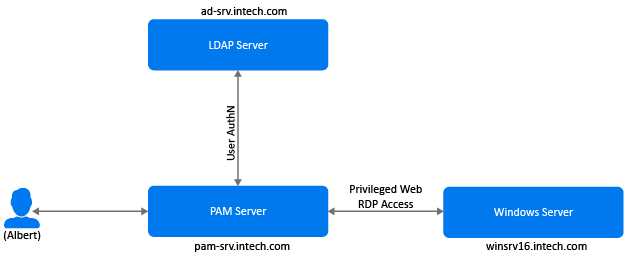
Markus wants to enforce Windows Agentless Web RDP to secure the Windows server. With this implementation, designated employees can access the Windows server through PAM User console for privileged access, and each action is recorded and monitored for auditing purposes. If employees perform any action that poses potential risk, such as deleting, copying data, and so on, the actions are recorded. Markus can suspend the just-in-time session if he is monitoring the active session.
The following diagram depicts the requirement of this use case:
This section explains the prerequisites, flow of actions, and step-by-step configuration details to achieve this requirement.
Flow Diagram
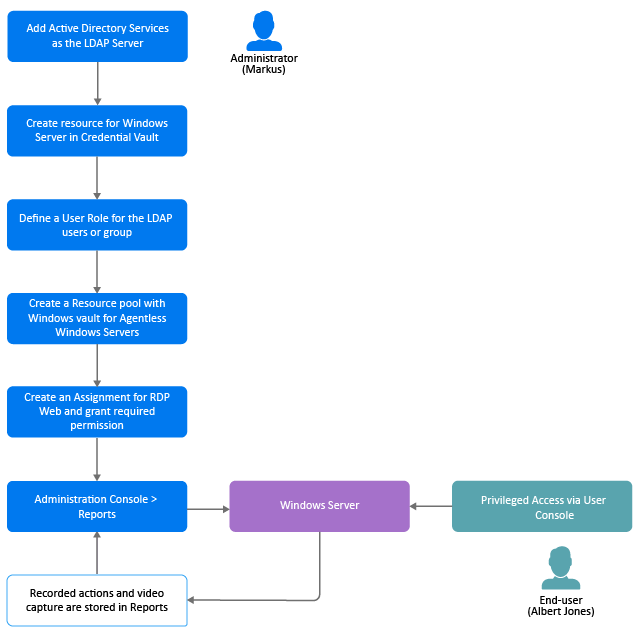
The following diagram illustrates the sequential flow of configuration required for implementing the Windows Agentless Web RDP:
Prerequisites
-
Privileged Access Manager is installed with the required Agentless module.
NOTE:The agentless component of Privileged Access Manager (agentless) is supported on SLES 12 (64-bit), SLES 15 (64-bit), Oracle Linux 8 (64-bit), and RHEL 8(64-bit).
-
Enable the option in > .
-
Import the CA certificate on the system where Privileged Access Manager is installed to enable communication over Secure Sockets Layer (SSL).
Follow the below mentioned procedure:
After Markus implements Windows Agentless Web RDP, the following are possible scenarios:
|
Scenario |
Result |
|---|---|
|
Albert logs in to the User Console and accesses the Windows Server. Later, he installs software and configures it. |
Each action is recorded, the live session video is captured, and stored in . No malicious activity is detected. |
|
Albert wants to access Windows Server on Thursday at 8 PM. |
The Windows Server resource is not available on the User Console for Albert. As Windows Server is accessible from 9 AM to 6 PM. |
|
Albert installs a malware on Windows Server unintentionally. |
The install procedure is recorded. When Markus checks the report and notices malware installation, he notifies Albert to uninstall the identified malware. |
|
Markus is monitoring the live session and Albert attempts to delete the server configuration. |
Markus terminates the session. Later, he drafts a mail with the reason and sends it to Albert. |