3.0 Examining the Elevated SSH Session without the Thick Client
Live Monitoring and Mitigation
Let us assume an organization, Intech Data, Inc. wants to assess the user actions during the elevated session to the Linux system that functions as the Web Server of the organization. The Linux system is accessed without the thick clients, such as PuTTy, MobaXterm, and so on. In the elevated session, an employee can access Linux system with the root permissions.
This example refers to the following user profiles:
-
Markus: An administrator of Intech Data, Inc.
-
Silvia Pereria: An employee of Intech Data, Inc.
Markus wants to implement Linux Agentless Web SSH to secure the elevated session from internal misuse. With this implementation, authorized employees can access Linux system through the User Console for elevated access and each Keystore is captured and recorded for auditing purposes. Also, Markus has the authority to inspect the live session and perform the following upon noticing any suspicious activity, such as changing the system configuration, installing an unauthorized application, and so on:
-
Terminate the active session and send a notice to the user
-
Block access to the elevated session
The following diagram depicts the requirement of this use case:
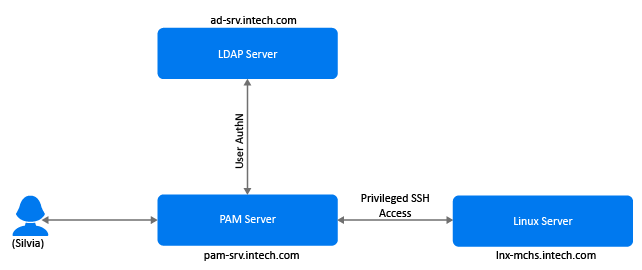
This section explains the prerequisites, flow of actions, and step-by-step configuration details to achieve this requirement.
Flow Diagram
The following diagram illustrates the sequential flow of configuration required for implementing the Linux Agentless Web SSH:
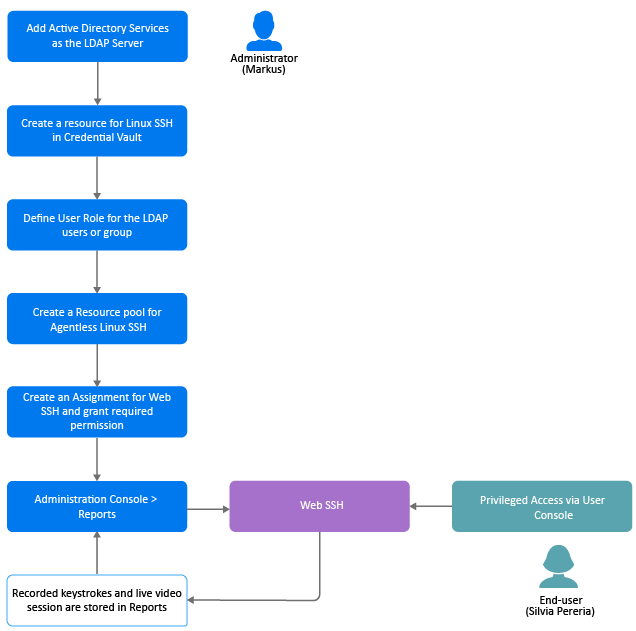
To achieve this requirement, Markus performs the following tasks:
Prerequisites
-
The Privileged Access Manager is installed with the required Agentless module.
NOTE:The agentless component of Privileged Access Manager (agentless) is supported only on SLES 12 (64-bit), SLES 15 (64-bit), Oracle Linux 8 (64-bit), and RHEL 8(64-bit).
-
Ensure to enable the option in > .
-
Import the CA certificate on the system where you have installed Privileged Access Manager to enable communication over Secure Sockets Layer (SSL). For more information, see Exporting the Certificate From the Active Directory Server
After Markus implements Linux Agentless Web SSH, the following are possible scenarios:
|
Scenario |
Result |
|---|---|
|
Silvia logs in to the User Console and accesses the elevated session on Linux. Later, she executes some commands. |
Each command is recorded and the live session video is captured. No malicious activity is detected. |
|
Silvia installs malware on Linux SSH unintentionally. |
The install procedure is recorded. When Markus goes through the recorded session and notices malware installation, he notifies Silvia to uninstall the identified malware. |
|
Markus is monitoring the live session and Silvia attempts to modify the security controls. |
Markus terminates the session and blocks access to Linux SSH. Later, he drafts a mail with the reason and sends it to Silvia. |
|
Silvia deletes a configuration file. |
The action is recorded and saved in the . Markus can take relevant actions while auditing the report. |