10.5 Modifying Roles and Users
10.5.1 Modifying Roles
-
Log in to the Sentinel Log Manager as an administrator.
-
Click the link in the upper left corner of the page.
The tab is displayed in the right pane of the page.
-
Select the role that you want to modify from the section.
-
Click in the section.
The Edit Role form is displayed.
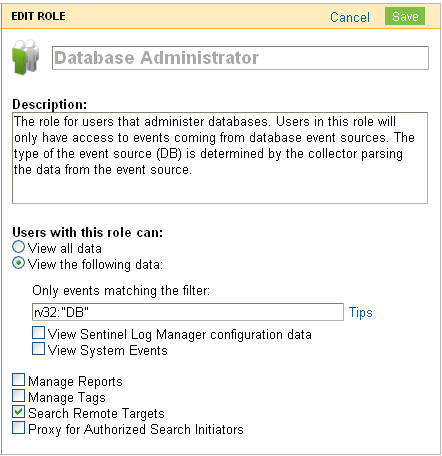
-
Modify the information in the field that you want to change.
-
Click .
10.5.2 Modifying User Details
Administrators can edit user information for a user in the system. Users can edit their own profiles except for the username and administrative privileges.
Modifying Your Own Profile
To edit your own profile:
-
Click the logged in user name in the upper left corner of the page.
The tab is displayed on the right pane of the page.
-
Modify the information in the pane.
-
Click .
Modifying Your Own Password
To change the password:
-
Click the logged in user name in the upper left corner of the page.
The tab is displayed on the right pane of the page.
-
Specify your current password.
-
Specify your new password.
-
Confirm your new password.
-
Click .
Modifying Another User’s Profile (admin only)
-
Log in to the Sentinel Log Manager as an administrator.
-
Click in the upper left corner of the page.
The tab is displayed in the right pane.
-
Select the User whose profile you want to change.
-
Click in the section.
-
Modify the information.
NOTE:You cannot modify the name of a user.
-
Click .