A.4 Step 3. Create a Service Hierarchy
After the database connection is established and the Business Metric Demo adapter is running, the next step is to set up a service hierarchy that you can define SLAs on.
For demo purposes, the organizational structure is very simple and requires the creation of two elements that have element children.
A.4.1 Creating the Service Hierarchy
-
In the pane, expand > .
-
Right-click , then select to open its dialog box.
-
Enter Customers in the field.
-
Click to add this element.
-
Right-click , then select to add .
A.4.2 Linking the New Elements
After creating the elements, you should link them to the elements pulled from the demo database.
To link the new elements:
-
In the pane, click .
-
In the view pane, click the tab.
-
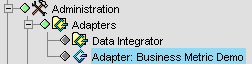
In the pane, navigate to without selecting it.
To do this, click the plus sign next to > :
-
Drag the folder to the open view for the element.
A relationship between the and the folder is created. Elements in the folder now drive the condition of the business view.