7.2 Importing Rulesets from File or Clipboard
It is possible to import pre-existing ruleset definitions created in the MAX/Enterprise ruleset editor or the Operations Center Event Manager Ruleset Editor.
7.2.1 Importing a Ruleset into the Event Manager
To import a ruleset:
-
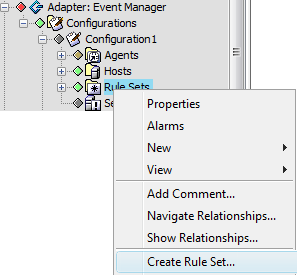
In the pane, expand the root element > > the Event Manager adapter > > a particular configuration.
-
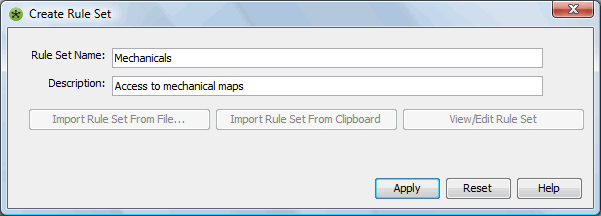
Right-click , then select to open the Create Rule Set dialog box:
-
Specify a name in the field and a description in the field (optional).
-
Click , which activates the ruleset option buttons.
7.2.2 Importing a Ruleset from a File
To import a ruleset from a file:
-
Click to open the Please Choose Rule Set Import File dialog box.
-
Browse the directories, then select a ruleset file.
-
Click
 to import the file.
7.2.3 Importing a Ruleset from the Clipboard
To import a ruleset from the clipboard:
-
Click .
The imported ruleset displays under in the pane.
7.2.4 Viewing or Editing the Imported Ruleset in the Ruleset Editor
To view or edit imported rulesets:
-
In the pane, expand the root element > > the Event Manager adapter > > a particular configuration > .
-
Right-click a ruleset, then select to open the Ruleset Editor.