3.3 Configuring User Preferences
The Data Integrator User Preferences dialog box enables selecting various settings, including an auto-save feature and default maximum settings for queries.
Figure 3-2 Data Integrator User Preferences Dialog
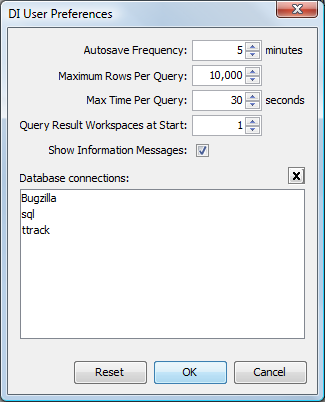
User preferences set auto-save frequency and query defaults and maintain database connections.
Set the following preferences for the Data Integrator Definition Editor:
3.3.1 Setting an Auto Save Frequency
-
In the Definition Editor, click > .
-
Use the spinner buttons to select the interval in minutes for the automatic save feature to run.
3.3.2 Setting the Maximum Number of Table Rows Per Query
-
In the Definition Editor, click >
-
Use the spinner buttons to select the number of rows that are allowed per query.
Enter ‑1 to allow an unlimited number of rows per query.
3.3.3 Setting the Maximum Time Allowed Per Query
-
In the Definition Editor, click >
-
Use the spinner buttons to select the time in seconds that are allowed to elapse per query.
Enter ‑1 to allow an unlimited amount of time.
3.3.4 Viewing Informational Messages When Using the Definition Editor
-
In the Definition Editor, click >
-
Select the check box to display alerts in specific cases.
For example, an informational message might be displayed in certain instances, such as when trying to edit a definition that is read-only or when a database connection must be defined.
-
(Optional) Deselect the check box to disable the message feature.
3.3.5 Deleting a Database Connection
-
In the Definition Editor, click >
All database connection profiles are listed in the list.
-
Select a database connection.
-
Click to delete the database connection.