A.1 Configuring the Adapter Definition Demo
Before examining the actual demo definition setting, it is necessary to import the sample adapter definition and configure the database connection. The following sections explain this process:
A.1.1 Importing the Sample Adapter Definition
To import the sample demo and demo adapter definition:
-
Copy the /OperationsCenter_install_path/demo/NorthWind Demo.jar file to the /OperationsCenter_install_path/integrations directory.
-
Copy the /OperationsCenter_install_path/demo/NorthWind DemoHierarchy.xml file to the /OperationsCenter_install_path/integrations directory.
-
In the pane, expand the root element > .
-
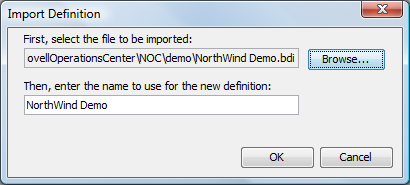
Right-click , then select to open the Import Definition dialog box.
-
Click , then select the Data Integrator definition file from the /OperationsCenter_install_path/demo.
To find the sample adapter definition, browse to find the /OperationsCenter_install_path/demo/northwind.bdi file.
-
Specify the name to use for the new definition or use the northwind default.
-
Click to import the adapter definition demo.
The imported sample definition displays in the pane hierarchy tree under the > > tree.
-
Because development database settings are stored with user preferences, redefine the database connection for the adapter definition.
For instructions, see Section A.1.2, Defining the Database Connection for the Sample Definition.
A.1.2 Defining the Database Connection for the Sample Definition
To define the database connection:
-
Right-click the sample adapter definition (Northwind, if you did not edit the name when importing), then select to open the Definition Editor.
-
In the Definition Editor, click > to display the wizard.
-
To define the database connection, select the radio button, then click .
-
Specify the new name in the field, then click .
-
Click the tab.
-
Specify the database settings that point to the Northwind DB included with the SQL Server database.
-
Click to save the settings and connect to the Northwind database.
-
View and explore settings in the Northwind sample definition.