4.6 Setting Preferences
Overall preferences can be set to determine the features included in your Summary pages, information included in your events feeds, default behavior for the pinboard, and the communities to show in your list (left sidebar).
Figure 4-2 illustrates setting preferences for the Summary page features and event notifications:
Figure 4-2 mySettings Summary Page
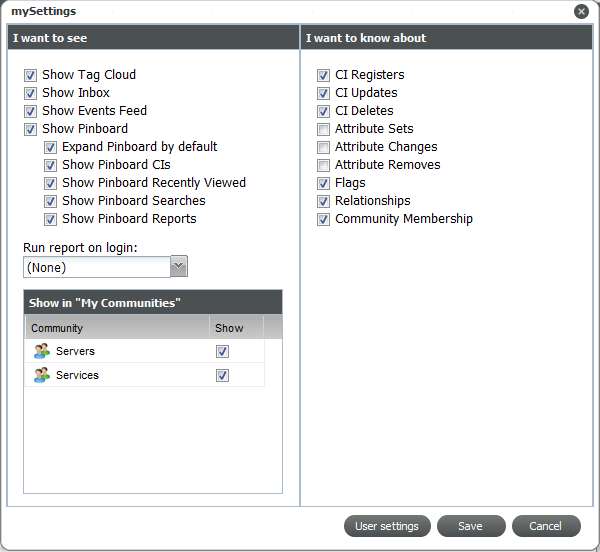
Options in the section of let you select the panels or functionality that are available in your CMS desktop and Summary pages. Options in the allow you to customize the type of notifications you’ll see in events feeds.
To set your preferences:
-
From the menu, select to open the mySettings dialog box.
-
From the section, to select the desired options to turn various features on/off:
-
Select any of check boxes to display the desired features on your Summary pages or desktop.
-
From the drop-down, select a report to add it to the bottom your Home’s Summary page.
The report is added on your next login.
-
From the section, select the check boxes for the communities that you want to have a community icon for in the left navigation of your pages.
-
-
From the section, select any desired check boxes to customize the notifications you receive in your events feeds.
-
Click to update your preferences.