8.3 Sample Configurations
8.3.2 A Firewall Separating Access Manager Components from the LDAP Servers
You can configure your Access Manager components so that your Administration Console is on the same side of the firewall as your Access Manager components and have a firewall between them and the LDAP servers.
Figure 8-2 A Firewall Separating the Administration Console and the LDAP Server
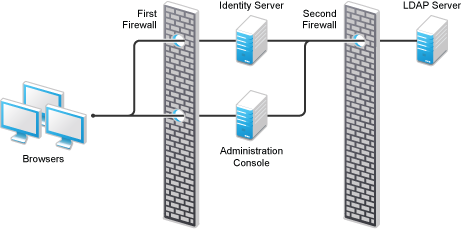
In this configuration, you need to have the following ports opened in the second firewall for the Administration Console and the Identity Server.
Table 8-9 Ports to Open in the Second Firewall
|
Ports |
Purpose |
|---|---|
|
TCP 636 |
For secure LDAP communication. This is used by the Identity Server and the Administration Console. |
|
TCP 524 |
For configuring eDirectory as a new User Store. NCP is used to enable SecretStore by adding a SAML authentication method and storing a public key for the Administration Console. During day-to-day operations, this port is not used. If your LDAP server is Active Directory or Sun ONE, this port does not need to be opened. |
8.3.3 Configuring a Firewall for SSL VPN
SSL VPN can be installed as a separate machine or as a component running on the Linux Access Gateway. Although it is configured to be a protected resource of the Access Gateway, it also allows direct communication with client browsers.
Figure 8-3 SSL VPN Server and Firewalls
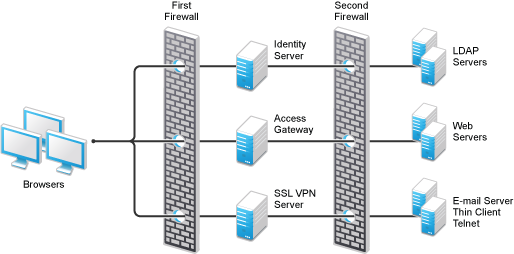
SSL VPN needs the following port opened on the first firewall if clients are accessing SSL VPN directly:
Table 8-10 Ports to Open in the First Firewall for SSL VPN
|
Port |
Purpose |
|---|---|
|
TCP 7777 |
For client communication. This is the default port. You can configure it to use TCP 443. |
You need to open ports on the second firewall according to the offered services.
Table 8-11 Ports to Open in the Second Firewall for SSL VPN
|
Port |
Purpose |
|---|---|
|
TCP 22 |
For SSH. |
|
TCP 23 |
For Telnet. |
|
Ports specific to an application. |
|