2.4 Basic Setup
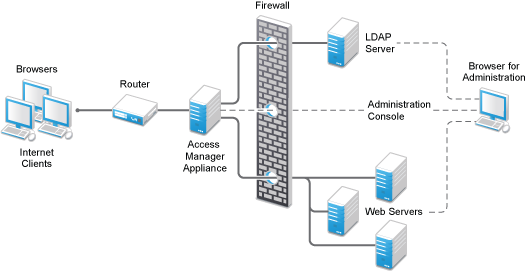
Figure 2-1 illustrates the basic Access Manager Appliance installation, where the Identity Server and Access Gateway are installed outside your firewall. The figure provides an overview of the flexibility built into Access Manager. You can use it to design a deployment strategy that fits the needs of your company.
Figure 2-1 Basic Configuration
For more information, see Section 3.3, Installing the Access Manager Appliance.
The firewall protects the LDAP server, which contains a permanent store of sensitive data. The Web servers are also installed behind the firewall for added protection. The Identity Server is not much of a security risk, because it does not permanently store any user data. This is a configuration that NetIQ has tested and can recommend. We have also tested this configuration with an L4 switch in place of the router so that the configuration can support clusters of Identity Servers and Access Gateways.