The Access Gateway Service consists of two main modules, a Gateway Manager module that runs on top of Tomcat and a Proxy Service module that runs on top of Apache. Figure 8-1 illustrates these modules and the communication paths that the Access Gateway Service has with other devices.
Figure 8-1 Access Gateway Service Modules
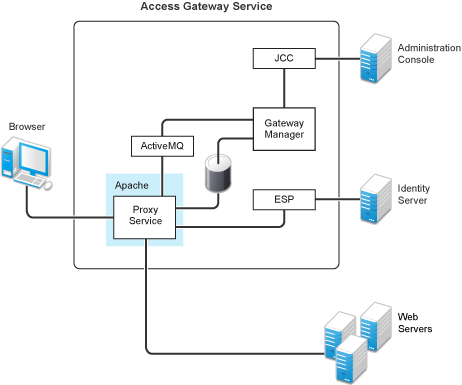
Proxy Service: This component runs as an instance of Apache and is responsible for controlling access to the configured protected resources on the Web servers. Low-level errors are reported in the Apache logs. Some higher-level errors are also reported to the files in the amlogging/logs directory.
ESP: The Embedded Service Provider is responsible for handling all communications with the Identity Server and is responsible for the communication that verifies the authentication credentials of users. Log entries for this communication process, including errors, are logged in the catalina.out file and the stdout.log file.
ActiveMQ: This module is used for real-time communication between the Administration Console and the Proxy Service. Errors generated from the Gateway Manager to the ActiveMQ module are logged to the Tomcat logs. Errors generated from the Proxy Service to the ActiveMQ module are logged to the Apache error logs.
JCC: The Java Communication Controller is the interface to the Administration Console. It handles health, statistics, configuration updates, and purge cache requests from the Administration Console. It is also responsible for certificate management. Errors generated between the JCC module and the Gateway Manager are logged to the ags_error.log file. Errors generated between the Administration Console and the JCC module are logged to the jcc-0.log.x file
Gateway Manager: This module is responsible for handling communication from JCC to the Proxy Service. It also writes the configuration commands to the Apache configuration files and the Proxy Service configuration file on disk. Errors generated while performing these tasks are logged to the ags_error.log file.
For more information about these various log files, see the following:
The Proxy Service module of the Access Gateway Service is built on top of Apache as an Apache application. This module handles the browser requests for access to resources and is responsible for sending authorized requests to the Web servers. Entries for these events are logged to the Apache log files.
/var/log/novell-apache2/
For more information, see sections Ignoring Some Standard Messages and Section 4.1, Managing Access Gateway Logs.
Apache cannot detect the proper use of domain-based multi-homing with wildcard certificates, which allows multiple proxy services to share the same SSL port. If you create reverse proxy services that are configured for domain-based multi-homing with SSL, Apache considers this a possible port conflict and logs it as a warning in the error.log file.
The error messages look similar to the following:
[<time and date stamp>] [warn] Init: SSL server IP/port conflict: dbmhnsnetid.dsm.cit.novell.com:443 (C:/Program Files/Novell/apache/conf/vhosts.d/dbmhNS-NetID.conf:18) vs. magwin1430external.dsm.cit.novell.com:443 (C:/Program Files/Novell/apache/conf/vhosts.d/magMaster.conf:18) [<time and date stamp>] [warn] Init: SSL server IP/port conflict: magdbmheguide.dsm.cit.novell.com:443 (C:/Program Files/Novell/apache/conf/vhosts.d/dbmhMagEguide.conf:18) vs. magwin1430external.dsm.cit.novell.com:443 (C:/Program Files/Novell/apache/conf/vhosts.d/magMaster.conf:18)
You can ignore these errors because the Access Gateway Service knows how to handle the traffic and send the packets to the correct proxy service.
For more information about Apache log files, see “Log Files”.
If the Apache error log file does not contain enough information, you can modify the log level and the types of messages written to the file.
WARNING: If you set the log level to debug, the size of the file can grow quickly, consume all available disk space, and crash the system. If you change the log level, you need to carefully monitor available disk space and the size of the error log file.
To modify what is written to the Apache error log file:
Change to the Apache configuration directory.
/etc/opt/novell/apache2/conf
Open the httpd.conf file.
Find the LogLevel directive and set it to one of the following:
debug, info, notice, warn, error, crit, alert, emerg
Save the file.
Restart Apache:
/etc/init.d/novell-apache2 restart OR rcnovell-apache2 restart
(Optional) If you set the level to debug and the log file still does not supply enough information, see Section 8.4, Enabling Debug Mode and Core Dumps.
|
Filename |
Description |
|---|---|
|
Contains the Apache messages generated for get and response traffic from the browsers. For information about setting the logging level for this file, see Modifying the Logging Level for the Apache Logs. To add X-Mag header or Form Fill messages, enable the advanced options. See Section 5.1, Configuring the Global Advanced Options. |
|
rcnovell-apache2.out |
Contains the Apache messages generated at start up. For information about setting the logging level for this file, see Modifying the Logging Level for the Apache Logs. |
|
ags_error.log |
Contains the messages generated for configuration, device imports, health, and statistics. It also contains entries for the policy evaluation processes done by the Gateway Service Manager module. When you apply changes on the Access Gateway, all enabled global advanced options or service level advanced options will be dumped to this log file. For additional information, see TID 7012563. |
|
jcc-0.log.x |
Contains the messages generated between the Administration Console and the JCC module. |
|
catalina.out |
Contains the log messages generated by the Embedded Service Provider. Logging to this file occurs only if you have selected the Echo to Console option from the Identity Servers > Servers > Edit > Logging page. Check this file for entries that trace the evaluation of Authorization, Identity Injection, and Form Fill policies. |
|
<log_profile> |
If you enable log profiles, you specify the name for the log file. You can select to log entries for the messages sent between the Gateway Service and the Embedded Service Provider (ESP), between the Gateway Service and the Web servers, and between the Gateway Service and the Administration Console. |
|
<reverse_proxy> |
If you enable logging on one or more reverse proxies, you specify the name for log file. To enable this type of logging, see Section 4.2, Configuring Logging for a Proxy Service. |