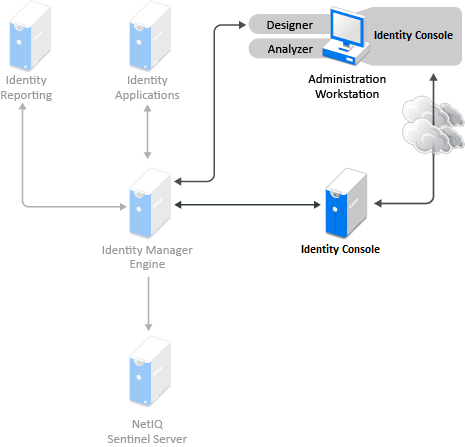
The two main management tools for the Identity Manager solution are Designer and Identity Console, as illustrated in Figure 11-2. Designer is used during the planning and creation of the Identity Manager solution, and Identity Console is used for daily management tasks of the Identity Manager solution.
Figure 11-2 Identity Manager Management Tools
Analyzer is a thick client that is installed on a workstation. Analyzer is used to examine and clean the data in the systems that you want to add to your Identity Manager solution. Using Analyzer during the planning phase helps you see what changes need to be made and how best to make those changes.
There are no major considerations for using Analyzer. For more information, see the NetIQ Analyzer for Identity Manager Administration Guide.
Designer is a thick client that is installed on a workstation. Designer is used to design, test, document, and then deploy your Identity Manager solution. Using Designer throughout the planning phase helps you capture information in one place. It also helps you see issues you might not be aware of as you look at all of the components of the solution together.
There are no major considerations for using Designer, unless you have multiple people working on the same project. Designer allows for version control of the project. For more information, see Version Control
in the NetIQ Designer for Identity Manager Administration Guide.
Identity Console is a Web application that is the administration tool for Identity Manager. When you install Identity Manager, the installation expects that you already have an Identity Console server installed in your eDirectory tree.
If you have more than 10 administrators constantly working in Identity Console at one time, you should have a server that hosts only Identity Console. Figure 11-2 represents this configuration of your Identity Manager solution. If you have only one administrator, you can run Identity Console on your Identity Manager server without complications.