1.4 Driver Features
The Azure AD driver supports the following features:
1.4.1 Supported Operations
By default, the Azure AD Driver synchronizes User and Group Objects, and Exchange Mailboxes. You can customize the driver to synchronize additional classes and attributes.
Add Supported Attributes:
Specify the appropriate configuration details while adding supported attributes. You can add multiple supported attributes if required
-
Attribute Name: Specify the name of the supported attribute to be added to the list.
-
Attribute Type: Specify the type of the supported attribute.
-
Multivalued: Specify if the attribute is multivalued.
-
Navigation Property: Specify if the attribute is a navigational property.
-
Class Name: Specify the class name to which the supported attribute belongs to.
Click “+” add the supported attributes to the list. Click “-” to remove the supported attribute from the list.
The driver supports the following operations on the Publisher Channel:
-
Add, Modify, Delete, And Query Operations.
-
Migrate Operation Only Through Azure Ad Attributes. Exchange Attributes Are Not Supported For Migration.
NOTE:The Password Synchronization is not supported in the Publisher Channel.
Attributes that are not supported by MS Graph API on Publisher Channel and Query are as listed Below. This list may subject to change.
-
“birthday”
-
“hireDate”
-
“mailboxSettings”
-
“deviceEnrollmentLimit”
-
“aboutMe”
-
“interests”
-
“mySite”
-
“pastProjects”
-
“preferredName”
-
“responsibilities”
-
“schools”
-
“skills”
-
“signinActivity”
-
“print”
-
“photo”
-
“physicalDeliveryOfficeName”
-
“LitigationHoldEnabled”
-
“ArchiveStatus”
-
“ServerLegacyDN”
-
“Type”
Unsupported Attributes for Query User:
-
“Birthday”
-
“Hiredate”
-
“Mailboxsettings”
-
“Deviceenrollmentlimit”
-
“Aboutme”
-
“Interests”
-
“Mysite”
-
“Pastprojects”
-
“Schools”
-
“Skills”
Unsupported Attributes for Query Group:
-
AutoSubscribeNewMembers
-
hasMembersWithLicenseErrors
-
allowExternalSender
-
autoSubscribeNewMember
-
hideFromAddressLists
-
hideFromOutlookClients
-
isSubscribedByMail
-
unseenCount
The following Exchange Groups can be added through the Publisher Channel:
-
Office 365 Group
-
Distribution Group
-
Security Group
-
Mail Enabled Security Group
-
Unified / Microsoft 365 Group
NOTE:You need to write a policy to set a value for while modifying a group membership.
The driver supports the following Operations on the Subscriber Channel:
-
Add, Modify, Delete, Migrate, And Query Operations On Users And Groups.
-
Add Or Delete Licenses Only On User Objects.
-
Set Or Reset A Password Only On User Objects.
-
Execute Powershell Cmdlets Using Policies.
-
Assign Or Revoke Roles And Licenses In Hybrid Mode.
The following Exchange Groups can be added through the Subscriber Channel:
-
Distribution Group
-
Security Group
-
Office 365 Group
-
Mail Enabled Security Groups
-
Unified/Microsoft 365 Groups
Support for SharePoint Online sites
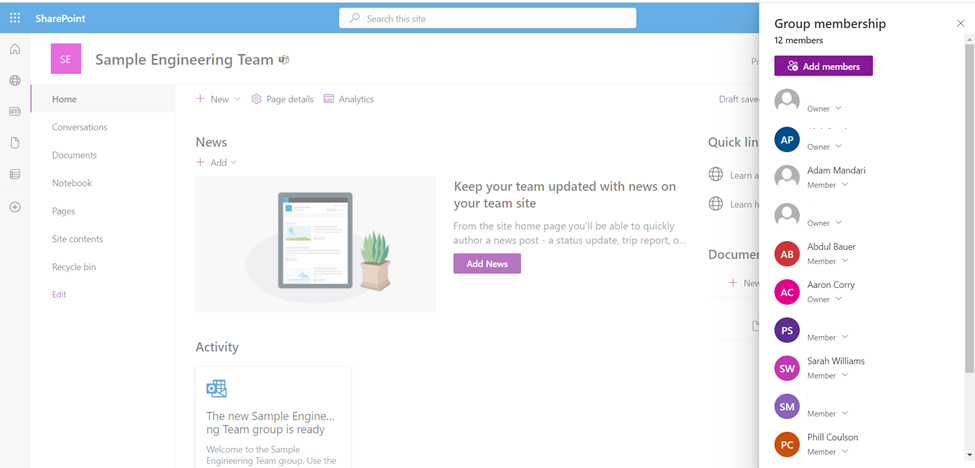
A SharePoint team site connects you and your team to shared content and resources. When you create a team site, a Microsoft 365 Group is automatically created. Any users you add to your team site are automatically added to your Microsoft 365 Group. Similarly, when you create a Microsoft 365 Group in Outlook, a SharePoint in Microsoft 365 team site is automatically created and any users you add to your Microsoft 365 Group get added to the team site.
NOTE:Only SharePoint Team site is supported but not the SharePoint Communication site.
Access the SharePoint Team site using the link: https://<tenant>.sharepoint.com/sites/<group>.
For example: https://asnlab.sharepoint.com/sites/SampleEngineeringTeam.
Figure 1-2
1.4.4 Hybrid Mode
The following figure shows the hybrid mode deployment scenario:
Figure 1-3
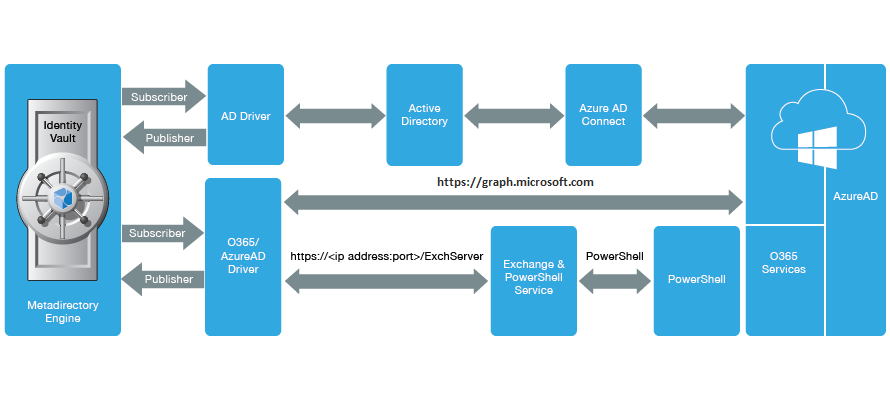
In this deployment, Azure AD Connect integrates on-premise Active Directory with Azure Active Directory. Azure Active Directory does not allow modifications on user and group objects that were synchronized through Azure AD Connect. However, it allows you to provision roles and licenses to the users. To accomplish this, you must deploy an Azure AD driver in hybrid mode. To synchronize identities from the Identity Vault to on-premise Active Directory, you must have an AD driver in your environment.
To provision roles and licenses, set the driver in hybrid mode in Designer or OpenText Identity Console. For more information, see Configuring the Driver.
The driver performs the following actions when operating in hybrid mode:
-
When a user is provisioned to AD through AD driver's user account entitlements and the user is synchronized to Azure AD through Azure AD Connect, the driver updates the user association in the OpenText Identity Vault.
-
When a user is deleted from Azure AD, the driver removes the association for the user from the OpenText Identity Vault.
-
When a user is granted or revoked roles or licenses through entitlements, the driver grants or revokes roles or licenses after an association is created for the user.
-
When an account entitlement is revoked for a user in AD, the driver removes the association for the user from the Identity Vault.
NOTE:You cannot add users, delete users, and modify user attributes through the publisher channel when you operate the Azure AD driver in hybrid mode. However, the Azure AD driver will update the associations accordingly.
In hybrid mode, the AD driver's account tracking takes precedence over Azure AD driver. The password synchronization to the Identity Vault is handled by AD driver in hybrid mode.