5.5 Configuring AWS Identity and Access Management

Change Guardian monitors the following in AWS IAM:

  • Access Control

  • Groups

  • Identity and Profiling

  • Policies

  • User Accounts

This section provides the following information:

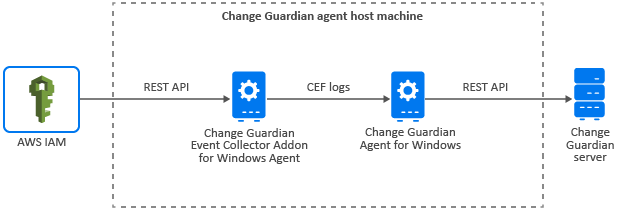
The following diagram illustrates how Change Guardian collects events from AWS IAM:

5.5.1 Implementation Checklist

Complete the following tasks to start monitoring AWS IAM events:

Task

See

Complete the prerequisites

Prerequisites

Add the license key

Adding a License Key

Configure Change Guardian for monitoring

Configuring Change Guardian for Monitoring

Triage events

Section 7.0, Managing Events

Section 8.0, Configuring Alerts

5.5.3 Configuring Change Guardian for Monitoring

You must configure the Change Guardian server to receive AWS IAM event logs from Change Guardian Event Collector Addon for Windows Agent.

Enabling AWS IAM Monitoring

To enable monitoring:

  1. In Agent Manager, select the asset and click Manage Installations > Install Agents.

    Or

    In Agent Manager, select the asset and click Manage Installations > Reconfigure Agents.

  2. In the Reconfigure Agent page, select Enable Collector Plugin under Edit Agent Configuration.

  3. Specify the location to store CEF events in CEF Data Output Path.

    NOTE:Ensure that the value in CEF Data Output Path matches the CEF data path you specify during Change Guardian Event Collector Addon for Windows Agent installation. You can get the CEF data path from the ceffolder parameter in <install_directory>\current\user\agent\agent.properties.

5.5.4 Categories of AWS IAM Policies

Access Control: Policies about the following:

  • Creating and deleting SAML

  • Server certificate

  • Signing certificate

  • Deleting, updating, and uploading SSH

  • Enabling, resyncing, and deactivating multi-factor authentication

  • Virtual multi-factor authentication

Groups: Polices about creating, changing, and deleting groups

Identity and Profiling: Policies about creating and deleting Instance Profile and OpenID Connect provider

Policies: Policies about the following:

  • Attaching and deleting group policy, role policy, and user policy

  • Creating and deleting policies and policy versions

User Accounts: Policies about the following:

  • Creating, changing and deleting access key, account alias, login profile, role, and user account

  • Changing user account password

For information about creating policies in Change Guardian, see Creating Change Guardian Policies.

After creating policies, you can assign them to assets. For information about assigning policies, see Working with Policies.