The server provides strong user authentication by using the chain-login concept. Each chain is a challenge-response login. The following chart describes chain logic. To get a successful authentication, the entire chain should be completed. A chain can consist of one or several authentication method(s).
Figure 3-2 Chain logic.
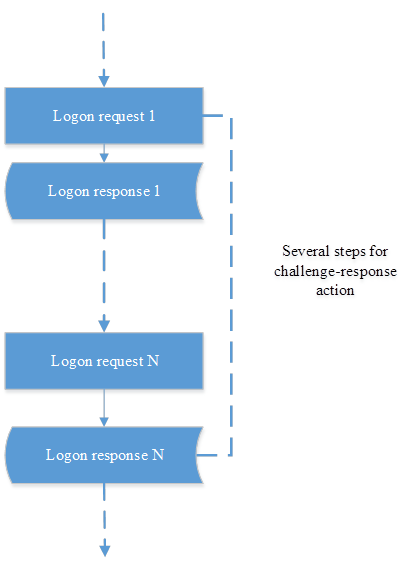
The user should start the logon process and pass all authentication methods. If all of them are successful, the user will login. If not, he/she will fail and should start the logon process once again.
API has the following standard responses for authentication status description.
Table 3-11 Response statuses.
|
Status name |
Status value |
Description |
|---|---|---|
|
OK |
OK |
This status is used to describe success result of logon process. Server has created the login session. |
|
More data |
MORE_DATA |
This status is used to indicate that authentication method requests for additional data for authentication. Each authentication method requests different data. |
|
Next |
NEXT |
This status indicate that current method finished, you should check completed_methods parameter from server response to be sure that current method was really finished. |
|
Failed |
FAILED |
This status is used for unsuccessful result of logon process description. It indicates that the logon process should be started once again. |
For additional information the server also returns the authentication reasons, the server has standard reasons for all authentication methods and specific reasons for each authentication method. Please check authentication method description for more information about supported authentication reasons.
Table 3-12 Common authentication reasons
|
Reason value |
Description |
|---|---|
|
METHOD_COMPLETED |
The authentication method was completed |
|
METHOD_NOT_NEEDED |
The authentication method not needed. The event does not work with this method |
|
METHOD_RETRY |
The authentication method was retried |
|
ENDPOINT_DISABLED |
The endpoint is disabled |
|
ENDPOINT_NO_ACCESS |
The endpoint has no access |
|
CHAIN_DISABLED |
The authentication chain is disabled |
|
CHAIN_COMPLETED |
The authentication chain was completed |
|
PROCESS_STARTED |
The authentication process was started |
|
PROCESS_NOT_FOUND_OR_EXPIRED |
The authentication process was not found or process is expired, you should start a new logon process |
|
USER_LOCKED |
User is locked |
Once the chain is completed, user’s data associated with event can be accessed. Event is the logical final destination for login process. Each event is a security point of the system and the login process provides authentication and authorization to this event. Organizations can create their own login chains with different authentication method. Currently the following authentication methods are supported.
Table 3-13 Authentication methods.
|
Authentication method name |
Authentication method identifier |
Description |
|---|---|---|
|
LDAP password |
LDAP_PASSWORD:1 |
Authentication by LDAP password, system uses different LDAP users repository and provide authentication by LDAP password, check the LDAP Password Authentication Method chapter |
|
One-time password based on hash algorithm |
HOTP:1 |
Authentication by OTP with hash algorithm, check the HOTP Authentication Method chapter |
|
One-time password based on time algorithm |
TOTP:1 |
Authentication by OTP with time based algorithm, check the TOTP Authentication Method chapter |
|
One-time password sending by e-mail |
EMAIL_OTP:1 |
Authentication by OTP sending by e-mail, check the Email Authentication Method chapter |
|
One time password sending by SMS |
SMS_OTP:1 |
Authentication by OTP sending by SMS, check the SMS Authentication Method chapter |
|
RADIUS password |
RADIUS:1 |
Authentication by RADIUS server, check the RADIUS Authentication Method chapter |
|
Security question |
SECQUEST:1 |
Authentication by security question, check the Security Questions Authentication Method chapter |
|
Smartphone authentication |
SMARTPHONE:1 |
Authentication by smartphone application, check the Smartphone Authentication Method chapter |
|
Virtual password |
PASSWORD:1 |
Authentication by password assign to user, check the Password Authentication Method chapter |
|
Voice call |
VOICE:1 |
Authentication by voice call, check the Voice Call Authentication Method chapter |
|
Cards |
CARD:1 |
Authentication by cards, check the Card Authentication Method chapter |
|
FIDO U2F |
U2F:1 |
Authentication by FIDO U2F tokens, check the FIDO U2F Authentication Method chapter |
|
Emergency password |
EMERG_PASSWORD:1 |
Authentication by emergency password, check the Emergency Password Authentication Method chapter |
|
NotarisID |
NOTARIS_ID:1 |
Authentication by NorarisID, see the “NotarisID authentication method” capter. |
|
PKI |
PKI:1 |
The authentication by PKI (Public key infrastructure), see the “PKI authentication method” chapter. |
Combining different authentication methods into authentication chains provides strong protection for different applications.
Before you start the logon process, you should create an endpoint session. The endpoint is the final destination for the login process. E.g., a client PC is an endpoint. One endpoint session can provide many logon processes. Endpoint session should be created once and used for all logon processes. For more information on endpoint session, check the Create Endpoint Session chapter.
API has two resources for providing login:
for starting the login session
for providing data to the authentication provider
This chapter describes how to provide a simple logon with one authentication method in the chain.
To start the logon process, the request should be sent to the following resource with URI:
/logon
Resource is provided by HTTP POST. It accepts JSON-object which describes the new logon process.
Table 3-14 Parameters for staring new login process.
|
Parameter name |
Description |
|---|---|
|
endpoint_session_id |
Endpoint session identifier. Identifier of endpoint which creates logon session. |
|
method_id |
Authentication method identifier. Identifier of method from authentication methods list that is supported by the server. This parameter defines which method will be used for authentication. To view the list of the supported methods, check the Authentication methods.. |
|
user_name |
User name for login. User name should be provided in format repo_name/user_name, where repo_name is user’s repository name from server, user_name is user name. |
|
event |
Event identifier. Event from list of events supported by server. |
|
is_1N |
The boolean flag identify is authentication will be 1:N or not, if true, that authentication will be 1:N, if false – not 1:N |
|
unit_id |
The unit identifier, use this value with is_1N flag, if you use this parameter you should not provide user name for the authentication |
Table 3-15 Created login session.
|
Parameter name |
Description |
|---|---|
|
chains |
JSON-object, which describe available chains for login. |
|
completed_methods |
JSON-array, which contain list of completed authentication methods supported by the server. |
|
current_method |
Current authentication method, which is used for authentication. |
|
msg |
Message about process, contains more information about authentication process or about errors. |
|
logon_process_id |
Logon process identifier, identifier of current logon process, this identifier is constant in the authentication process and is used in next steps. |
|
plugins |
JSON-array, that contain list of available plugins. |
|
status |
Current status of logon process, check the Response statuses. for more information. |
|
event_name |
The event name for started logon process |
|
reason |
The authentication reasons, please check the Common authentication reasons |
|
event_data_id |
The event data identifier for started logon process |
Chains JSON-object has these parameters.
Table 3-16 Chain JSON-object.
|
Parameter name |
Description |
|---|---|
|
methods |
JSON-array of authentication methods represented into chain. All of these methods should be successful for login. |
|
is_trusted |
Boolean flag which determinate is it trusted chain or not. |
|
name |
Name of authentication chain. |
|
image_name |
The image name for this chain |
|
apply_for_ep_owner |
This is a boolean flag, if true – this is an authentication chain for the endpoints owner and this chain will have priority over other chains |
|
position |
The position of this chain in an authentication chains list |
|
is_enabled |
The boolean flag, if it true chain is enabled, if false – disabled |
|
short_name |
The short name of the chain |
After starting the logon process, authentication data for the current authentication method in the chain should be sent. To send authentication data, use the following resource with URI:
/logon/{logon_process_id}/do_logon
Resource is provided by HTTP POST. It has the following parameters.
Table 3-17 URI parameters for sending authentication data.
|
URI parameter name |
Description |
|---|---|
|
logon_process_id |
Logon process identifier. Identifier of started logon process. |
Resource accepts data as JSON-object with these parameters.
Table 3-18 Parameters for providing authentication data.
|
Parameter name |
Description |
|---|---|
|
response |
JSON-object with authentication data for method. This object is different for all authentication methods. |
|
endpoint_session_id |
Endpoint session identifier. Identifier of endpoint, which works with logon session. |
Resource return JSON-object with data of authentication result.
Table 3-19 JSON-object with authentication result.
|
Parameter name |
Description |
|---|---|
|
chains |
JSON-object, which describes available chains for login, check the Table 3-16. Chain JSON-object for more information. |
|
current_method |
Current authentication method, which is used for authentication. |
|
logon_process_id |
Logon process identifier, identifier of current logon process, this identifier is constant in the authentication process and is used in next steps. |
|
completed_methods |
JSON-array, which contains list of completed authentication methods supported by server. |
|
status |
Current status of logon process. Check the About Login Process for more information. |
|
repo_id |
Repository identifier, server identifier of users’ repository. |
|
user_name |
User name. |
|
user_id |
User server identifier. |
|
msg |
Message about process, contains more information about authentication process or about errors. |
|
login_session_id |
Login session identifier, identifier of success authentication session. |
|
plugins |
JSON-array, that contain list of available plugins. |
|
reason |
The authentication reasons, please check the Common authentication reasons |
|
event_name |
The event name |
|
repo_obj_id |
The identifier of the repository object |
|
user_sid |
The user’s SID |
|
user_name |
The user name, e.g. COMPANY\JSmith |
|
user_mobile_phone |
The user’s mobile phone if it presents. |
|
user_dn |
The user FQDN-name |
|
event_data_id |
The event data identifier |
|
user_sid_hex |
The user’s SID as hex-string |
|
user_email |
The user’s email if it presents |
|
user_cn |
The user canonical domain name |
|
data_id |
The data identifier |
|
user_name_netbios |
The user’s NETBIOS name, if user came from Active Directory |
|
user_upn |
The user principal name, if user came from Active Directory |
Each authentication method has a different number of challenge-response steps, check method description for more information.
On the following example, user “JSmith” from repository “COMPANY” tries to login to the NAM endpoint with session identifier “46kGFB3MUUebkcqosO9t4pVAVURsCMyz”.
HTTP POST
https://authserver.example.com/api/v1/logon
Request
{
"method_id":"LDAP_PASSWORD:1",
"user_name":"COMPANY\\JSmith",
"event":"NAM",
"endpoint_session_id":"46kGFB3MUUebkcqosO9t4pVAVURsCMyz"
}
Response
{
"plugins": [],
"event_name":"NAM",
"msg":"Process started",
"status":"MORE_DATA",
"reason":"PROCESS_STARTED",
"current_method":"LDAP_PASSWORD:1",
"completed_methods":[],
"chains":[
{
"is_enabled":true,
"apply_for_ep_owner":false,
"is_trusted":null,
"image_name":"default",
"name":"LDAP password",
"position":0,
"methods":["LDAP_PASSWORD:1"],
"short_name": ""
}],
"logon_process_id":"zGjcx3Kbh3scIbTXXCefo1lR86BZ5V0k",
"event_data_id":"OSLogon"
}
HTTP POST
https://authserver.example.com/api/v1/logon/zGjcx3Kbh3scIbTXXCefo1lR86BZ5V0k/do_logon
Request
{
"response":
{
"answer":"123"
},
"endpoint_session_id":"46kGFB3MUUebkcqosO9t4pVAVURsCMyz"
}
Response
{
"msg":"Welcome!",
"user_mobile_phone":"+16086783619",
"event_name":"NAM",
"repo_id":"d3fba00652d211e5a19a000c2951aca4",
"user_email":"jsmith@company.com",
"user_name": "COMPANY\\JSmith",
"user_dn":"CN=JSmith,CN=Users,DC=company,DC=com",
"completed_methods":["LDAP_PASSWORD:1"],
"chains":[
{
"is_enabled":true,
"apply_for_ep_owner":false,
"is_trusted":null,
"image_name":"default",
"name":"LDAP password",
"position":0,
"methods":["LDAP_PASSWORD:1"],
"short_name": ""
}],
"user_sid":"S-1-5-21-4279545561-3293806183-1755797738-500",
"user_name_netbios":"COMPANY\\JSmith",
"user_cn":"JSmith",
"user_id":"ab2b845652d311e5a19a000c2951aca4",
"login_session_id":"BF7xjPVyO9wSqFj9UY0II1qzsemfcVqD",
"plugins":["LdapRules"],
"data_id":"OSLogon",
"status":"OK",
"reason":"CHAIN_COMPLETED",
"current_method":"LDAP_PASSWORD:1",
"user_sid_hex":"010500000000000515000000d9ae14ff677e53c4ea58a768f40100",
"logon_process_id":"zGjcx3Kbh3scIbTXXCefo1lR86BZ5V0k",
"event_data_id":"OSLogon",
"repo_obj_id":"2d3c89ccb3ea7b4dacbdfda13e26f450"
}
Chained authentication is like a simple authentication, it uses from the same logic as the simple authentication process and has the same JSON-object and other parameters. The differences are in step count, chained authentication combines many authentication methods and all of them should be passed successfully.
The logic of the chained authentication is displayed on the following chart. In this login, you should start next authentication method until you get successful or unsuccessful result. When the logon process is started, it will be required to choose authentication method and provide data for this authentication method at first iteration of logon process.
Figure 3-3 Picture 5. Chained authentication.
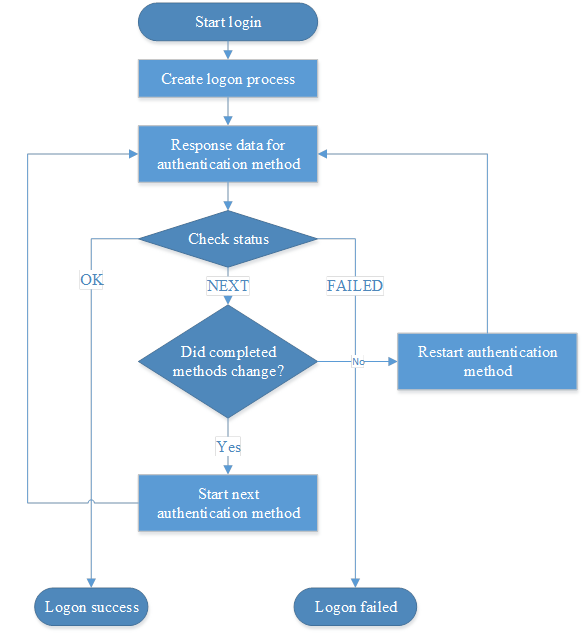
API for chained login has an additional resource for starting next authentication method, this resource has the following URI:
/logon/{logon_process_id}/next
Resource is provided by HTTP POST. It has the following URI parameter.
Table 3-20 URI parameters for starting next authentication method.
|
URI Parameter name |
Description |
|---|---|
|
logon_process_id |
Logon process identifier, identifier of started logon process. |
Resource accepts JSON-object which contains information about the next authentication method.
Table 3-21 Parameters for starting next authentication method.
|
Parameter name |
Description |
|---|---|
|
endpoint_session_id |
Endpoint session identifier. Identifier of endpoint, which will create logon session, check the Create Endpoint Session chapter for more information. |
|
method_id |
Authentication method identifier. Identifier of next method from authentication methods list that is supported by server. This parameter defines which method will be used for authentication, check Authentication methods. for more information. |
Resource return JSON-object equal to JSON-object returned form resource for starting logon process, check the Created login session. for more information. Other requests to resources used for chained login described in the same chapter.
In the following example, user with username “JSmith” from users’ repository “COMPANY”, tries to logon from endpoint with session identifier “LTcnApseCzyFQCnDbxdid3rEvkgWk2f2”, user use chain with LDAP password and counter based one-time password, user authenticates to the NAM event.
HTTP POST
https://authserver.example.com/api/v1/logon
Request
{
"method_id":"LDAP_PASSWORD:1",
"user_name":"COMPANY\\JSmith",
"event":"NAM",
"endpoint_session_id":"LTcnApseCzyFQCnDbxdid3rEvkgWk2f2"
}
Response
{
"event_name":"NAM",
"reason":"PROCESS_STARTED",
"completed_methods":[],
"chains":[
{
"position":0,
"methods":["LDAP_PASSWORD:1", "HOTP:1"],
"is_enabled":true,
"name":"Password & HOTP",
"image_name":"default",
"apply_for_ep_owner":false,
"short_name":"",
"is_trusted":null
}],
"current_method":"LDAP_PASSWORD:1",
"status":"MORE_DATA",
"event_data_id":"OSLogon",
"plugins":[],
"msg":"Process started",
"logon_process_id":"cdlsXhjaEHOaPiwTlOck5p0xGaqgkNJB"
}
HTTP POST
https://authserver.example.com/api/v1/logon/cdlsXhjaEHOaPiwTlOck5p0xGaqgkNJB/do_logon
Request
{
"response":
{
"answer":"P@$sW0rd"
},
"endpoint_session_id":"LTcnApseCzyFQCnDbxdid3rEvkgWk2f2"
}
Response
{
"event_name":"NAM",
"user_email":"jsmith@company.com",
"user_dn":"CN=John Smith,CN=Users,DC=company,DC=local",
"user_sid":"S-1-5-21-4279545561-3293806183-1755797738-1602",
"user_upn":"JSmith@company.local",
"user_id":"395e14fc65ec11e58f04000c2951aca4",
"plugins":["LdapRules"],
"repo_id":"cd2ce1fa65eb11e58f04000c2951aca4",
"completed_methods":["LDAP_PASSWORD:1"],
"msg":"Continue with next login method",
"user_name_netbios":"COMPANY\\JSmith",
"reason":"METHOD_COMPLETED",
"repo_obj_id":"373bf00f9421394ab36c69f9d82283e4",
"chains":[
{
"position":0,
"methods":["LDAP_PASSWORD:1", "HOTP:1"],
"is_enabled":true,
"name":"Password & HOTP",
"image_name":"default",
"apply_for_ep_owner":false,
"short_name":"",
"is_trusted":null
}],
"current_method":"LDAP_PASSWORD:1",
"status":"NEXT",
"user_sid_hex":"010500000000000515000000d9ae14ff677e53c4ea58a768420600",
"event_data_id":"OSLogon",
"user_cn":"John Smith",
"logon_process_id":"cdlsXhjaEHOaPiwTlOck5p0xGaqgkNJB",
"user_name":"COMPANY\\John Smith"
}
HTTP POST
https://authserver.example.com/api/v1/logon/cdlsXhjaEHOaPiwTlOck5p0xGaqgkNJB/next
Request
{
"method_id":"HOTP:1",
"endpoint_session_id":"LTcnApseCzyFQCnDbxdid3rEvkgWk2f2"
}
Response
{
"event_name":"NAM",
"reason":"PROCESS_STARTED",
"completed_methods":["LDAP_PASSWORD:1"],
"chains":[
{
"position":0,
"methods":["LDAP_PASSWORD:1", "HOTP:1"],
"is_enabled":true,
"name":"Password & HOTP",
"image_name":"default",
"apply_for_ep_owner":false,
"short_name": "",
"is_trusted":null
}],
"current_method":"HOTP:1",
"status":"MORE_DATA",
"event_data_id":"OSLogon",
"plugins":[],
"msg":"Process started",
"logon_process_id":"cdlsXhjaEHOaPiwTlOck5p0xGaqgkNJB"
}
HTTP POST
https://authserver.example.com/api/v1/logon/cdlsXhjaEHOaPiwTlOck5p0xGaqgkNJB/do_logon
Request
{
"response":
{
"answer":"150522"
},
"endpoint_session_id":"LTcnApseCzyFQCnDbxdid3rEvkgWk2f2"
}
Response
{
"event_name":"NAM",
"user_email":"jsmith@company.com",
"user_dn":"CN=John Smith,CN=Users,DC=company,DC=local",
"plugins":["LdapRules"],
"repo_id":"cd2ce1fa65eb11e58f04000c2951aca4",
"msg":"Welcome!",
"logon_process_id":"cdlsXhjaEHOaPiwTlOck5p0xGaqgkNJB",
"reason":"CHAIN_COMPLETED",
"repo_obj_id":"373bf00f9421394ab36c69f9d82283e4",
"user_cn":"John Smith",
"user_sid":"S-1-5-21-4279545561-3293806183-1755797738-1602",
"event_data_id":"OSLogon",
"user_id":"395e14fc65ec11e58f04000c2951aca4",
"user_upn":"JSmith@company.local",
"login_session_id":"NjHg8gVLMwYI84BDzlgFxNn5HI53ioI2",
"user_name_netbios":"COMPANY\\JSmith",
"completed_methods":["LDAP_PASSWORD:1", "HOTP:1"],
"chains":[
{
"position":0,
"methods":["LDAP_PASSWORD:1", "HOTP:1"],
"is_enabled":true,
"name":"Password & HOTP",
"image_name":"default",
"apply_for_ep_owner":false,
"short_name":"",
"is_trusted":null
}],
"current_method":"HOTP:1",
"status":"OK",
"user_sid_hex":"010500000000000515000000d9ae14ff677e53c4ea58a768420600",
"data_id":"OSLogon",
"user_name":"COMPANY\\John Smith"
}
The 1:N authentication could contain one or more chains and it equals non 1:N authentication. For starting 1:N authentication you should at first provide the unit identifier and set the 1:N flag to true and you should exclude user name from first request. The 1:N logon process is absolutely the same as non 1:N logon process, provide authentication data to the method and work with methods as you work with non 1:N logon process.
Before you start the logon process, you should get available authentication chains for this endpoint and user. The API has the following resource for this with URI.
/logon/chains?user_name={user_name}&event={event}&endpoint_session_id={endpoint_session_id}
Resource provided by HTTP GET and has these parameters.
Table 3-22 Parameters for getting available chains.
|
URI parameter name |
Description |
|---|---|
|
user_name |
User name, this parameter is optional, if you use this parameter, server return chain only for this user, if not – chains for all users. |
|
event |
Event identifier from server supported events list. Check “Supported events list” for getting events list. |
|
endpoint_session_id |
Endpoint session identifier, identifier of endpoint session, which want to get the chains. Check the Create Endpoint Session chapter for more information. |
Resource return JSON-object, which contain list of available chains.
Table 3-23 Object with available chains.
|
Parameter name |
Description |
|---|---|
|
chains |
Chain, this parameter using for wrapping of chains JSON-object array, chain object described in Chain JSON-object., check for more information about chain object. |
On the following example, endpoint with session “2NC69uuu0r63fYpqamMSJfYEVjIkSsbv” tries to get all trusted chains available for NAM event.
HTTP GET
https://authserver.example.com/api/v1/logon/chains?event=NAM&endpoint_session_id=2NC69uuu0r63fYpqamMSJfYEVjIkSsbv&is_trusted=true
Response
{
"chains":[
{
"methods":["LDAP_PASSWORD:1", "RADIUS:1"],
"is_trusted":true,
"name":"RADIUS and LDAP",
"position":0,
"is_enabled":true,
"image_name":"default",
"apply_for_ep_owner":false,
"short_name":""
},
{
"methods":["LDAP_PASSWORD:1", "TOTP:1"],
"is_trusted":true,
"name":"TOTP and LDAP",
"position":1,
"is_enabled":true,
"image_name":"default",
"apply_for_ep_owner":false,
"short_name":""
},
{
"methods":["LDAP_PASSWORD:1", "HOTP:1"],
"is_trusted":true,
"name":"HOTP and LDAP",
"position":2,
"is_enabled":true,
"image_name":"default",
"apply_for_ep_owner":false,
"short_name":""
}]
}
The administrator of the Advanced Authentication appliance can manage the authentication chains priority and appliance will return chains in defined priority. You should use chain as it returned from the appliance. The chain which is highest on the priority list should be used first. For example, event has chain with LDAP authentication and chain with LDAP authentication and authentication by smartphone, and chain with LDAP authentication is higher, in this case for success authentication user should do LDAP authentication, it will be enough, but user also could add smartphone authentication after LDAP as additional authentication, appliance will allow this. If user not enroll method appliance will not return chains with this method. Same logic appears if the user could not use some of the method, for example, user have not phone number in user’s repository.
You can delete the logon process, you can use the following resource with URI
/logon/{logon_process_id}?endpoint_session_id={endpoint_session_id}
Resource provided by HTTP DELETE and has these URI parameters.
Table 3-24 URI parameters for deleting logon process.
|
URI parameter name |
Description |
|---|---|
|
logon_process_id |
Logon process identifier, identifier of process for deleting. |
|
endpoint_session_id |
Endpoint session identifier, identifier of endpoint session, which wants to delete the login process. Check the Create Endpoint Session chapter for more information. |
The resource does not return any data, if deleting was successful the method return HTTP 200 status.
On the following example, endpoint with session identifier “Sm7hACXcyvfl4ApoQ17g5QntE0q1ZW1K” deletes logon process with identifier “wLlxiBUCDDiTRJtL0xJPOeZpWfNcWfoH”.
HTTP DELETE https://authserver.example.com/api/v1/logon/wLlxiBUCDDiTRJtL0xJPOeZpWfNcWfoH?endpoint_session_id=Sm7hACXcyvfl4ApoQ17g5QntE0q1ZW1K Response HTTP 200