2.1 Logon Process
The logon process provides authentication and authorization, the enrollment process stores authentication information for new authentication methods. For enrollment, you should be authenticated before. The following picture describes the logon process.
Figure 2-1 Picture 1 - Logon process
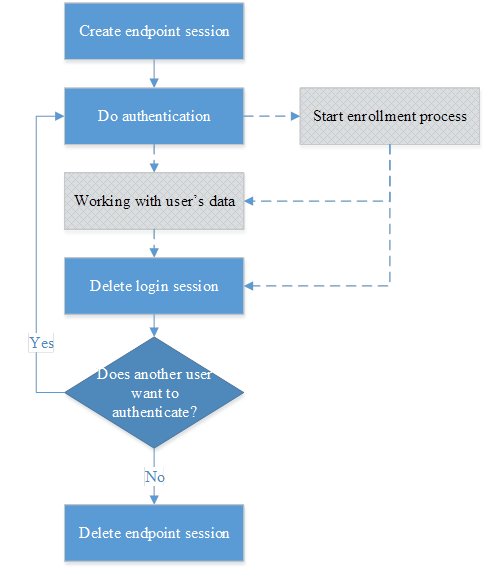
The logon process includes several steps:
-
Create endpoint session – Endpoints are devices which connect to the server. A valid endpoint session is needed in order to communicate with the server. This is a sub process. For more information, check the Working With Endpoint Sessions chapter.
-
Do authentication – The user can perform the actual authentication after creating the endpoint session. Authentication is a sub process. For more information, check the Provide Authentication chapter.
-
Working with user's data – Information about a user like password or any other credential can be stored in the user data container and can be accessed after a successful authentication. For more information, check the Working With User's Data chapter. It is also possible to start an enrollment after successfully authenticating the user.
-
Delete login session – After authentication the login session should be deleted. For more information, check the Delete Login Sessions chapter.
-
Does another user want to authenticate? - after the login session is deleted, the system will wait for another user. If a new user wants to login, the process will be started from the second step because the endpoint is already created.
-
Delete endpoint session - the logon process will delete endpoint session at the end. For more information, check the Delete Endpoint Session chapter.