X 在 Microsoft Azure Kubernetes Service 上部署 OpenText Identity Manager 容器
此版本允許您在 Microsoft Azure Kubernetes Service 上部署 OpenText Identity Manager 容器。可以借助 Terraform 和 Helm 圖表來自動完成 OpenText Identity Manager 容器部署。
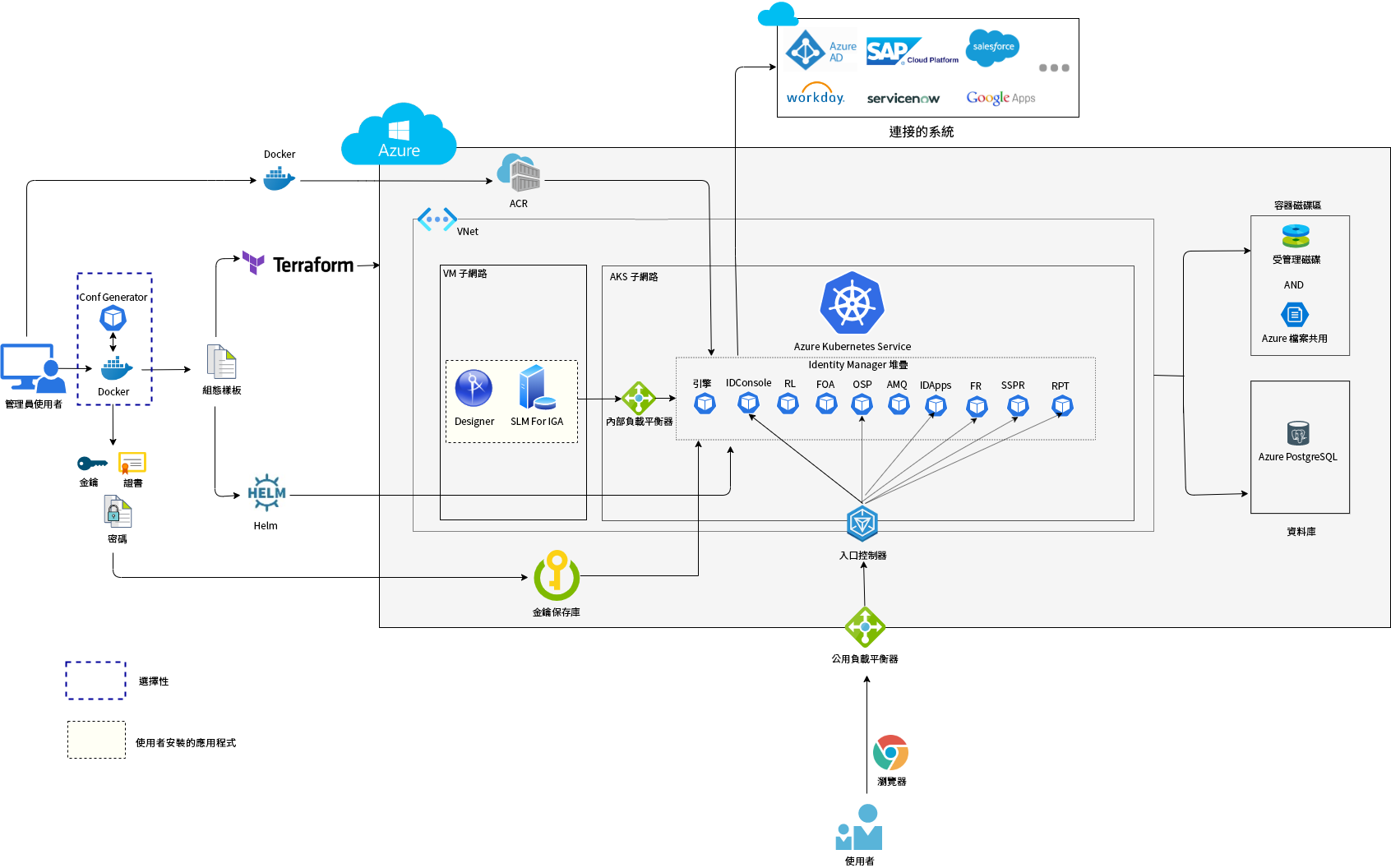
下圖提供了在 Azure 上部署容器的架構檢視。
-
ACRcreate.sh 檔案建立新的 Azure 容器登錄,並允許使用者在 Azure 入口網站中上傳/儲存 Docker 影像。
-
OpenText Identity Manager Configuration Generator 影像用於完成下列任務:
-
產生組態檔案 (Terraform 檔案和 Helm 圖表)。
-
建立 Azure 資源群組。
-
在 Azure 資源群組下建立金鑰保存庫。
-
將所有敏感性資訊推入金鑰保存庫。
-
-
使用者可以使用 Terraform 程序檔設定基礎架構,例如:
-
網路建立。
-
Azure PostgreSQL (選擇性)。
-
Azure Kubernetes Service (AKS)。
-
-
使用者可以使用 Helm 圖表在 Azure Kubernetes 叢集內部署 OpenText Identity Manager 容器。
-
NGINX 入口控制器用做反向代理,用於存取 AKS 叢集內執行的 OpenText Identity Manager Web 應用程式 (包括 Identity Applications、Identity Reporting 和 OpenText Identity Console 等)。
-
需要購買單一網域 (例如 identitymanager.eastus.cloudapp.azure.com)。
-
該網域將指定給 Nginx 入口控制器。
-
-
內部負載平衡器用於引擎 Docker 主機與 Kubernetes 叢集之間的內部通訊。
-
永續性儲存是動態建立的,將在整個基礎架構中掛接。
-
可將 Identity Applications 和 Identity Reporting 設定為使用 Azure 提供的 Azure PostgreSQL 資料庫。
-
用於 Identity Governance 管理的 Designer 和 Sentinel Log Management (SLM) 應在 Terraform 執行完成後由使用者手動部署。
綜覽
若要規劃 Azure Kubernetes 叢集上的 OpenText Identity Manager 容器部署,請參閱以下章節: