5.0 Setting the Wizard Mode Preference
Access to the Application Definition Wizard is controlled by the SecureLogin Wizard Mode preference, which is available in the administrative management utilities. You can enable or disable access to the Application Definition Wizard for users.
-
Launch the administrative management utilities (iManager, SLManager, or MMC snap-ins).
-
Navigate to > > .
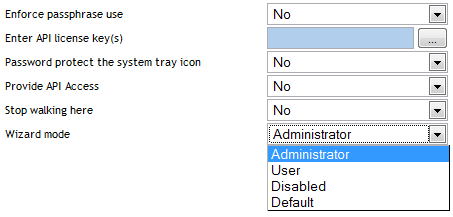
The has three settings:
-
Administrator: The option controls users access to the Application Definition Wizard.
If the is set to Administrator, users can create and edit application definitions by using the Wizard.
This is the default setting.
-
User: The preference controls a user’s ability to create login credential sets for new applications by using the auto-detection setting.
If the preference is set to :
-
The option is not available when an application is detected for single sign-on.
-
The button is disabled in the SecureLogin Client Utility.
-
The option is not available from the SecureLogin icon in the notification area.
-
-
Disabled: This preference controls launching the Application Definition Wizard when an application is detected for single sign-on.
If the preference is set to :
-
All automatic prompts to enable an application for single sign-on are disabled. The user is not prompted to enable any application for single sign-on.
-
The button is disabled in the SecureLogin Client Utility.
-
The option is not available from the SecureLogin icon in the notification area.
NOTE:The preference overrules the preference. If users are not allowed to modify application definitions, the Wizard preference has no effect.
-
Default: The setting is the same as Administrator setting.
-
-
-
Select the options you want to set.
-
Click and to save and exit.