Example Scenarios
Scenario 1
Consider the following scenario:
-
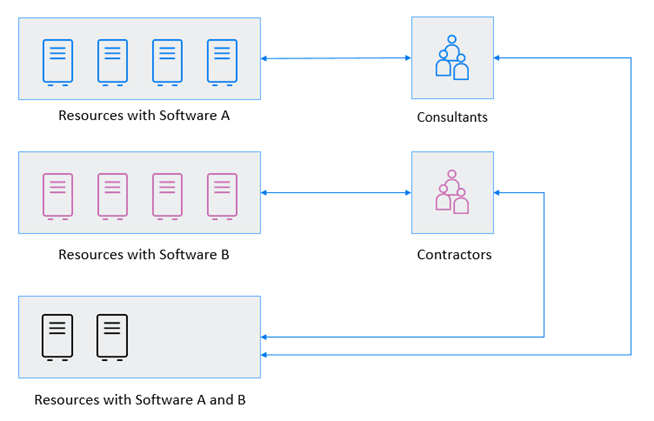
An organization contains two user roles named consultants and contractors, need access on ten resources
-
Consultants role need access on four resources where software A installed
-
Contractors role need access on four resources where software B installed.
-
Both roles need access on two shared resources where both software A and B are installed.
Steps to provide privileged access in this scenario:
Resource Pools
-
Create a Resource Pool (A) with four Resources where software A is installed.
-
Create a Resource Pool (B) with four Resources where software B is installed.
-
Create a Resource Pool (AB) with four Resources where both software A and B are installed.
User Roles
-
Create a User Role – Consultants and include the required users
-
Create a User Role – Contractors and include the required users
Assignments and Permissions
-
Create an assignment between Resource Pool A and Consultants and define required permissions.
-
Create an assignment between Resource Pool B and Contractors and define required permissions.
-
Create an assignment between Resource Pool AB and Consultants and define required permissions.
-
Create an assignment between Resource Pool AB and Contractors and define required permissions.
Figure 6-2 Usage Scenario Permissions
Scenario 2
Consider the following scenario:
-
A user role needs access to a set of Windows Agents over weekdays with Privilege elevation. Administrator wants to monitor the activity as well as controlling file access and blocking certain applications from execution.
-
The same user role needs access on those resources over weekends without elevation.
Steps to provide privileged access in this scenario:
Resource Pools
-
Link the Agents to appropriate Credential Vaults, where all the required credentials are present.
-
Create a Resource Pool with all the required Windows Agents in it.
User Roles
-
Create a User Role with all the required users.
Assignments
-
Create an Assignment between the created Resource Pool and User Role.
Permissions
-
Create a Credential Provider Permission with below options
-
Privilege Elevation as required (Example: Administrator).
-
Define Time Restrictions with Monday 00:00 to Saturday 00:00.
-
Enable Session Capture and Video Capture.
-
Configure Enhanced Access Control for Files. Directories and Executables and add it in this permission.
-
-
Create another Credential Provider Permission with below options:
-
Privilege Elevation with any other account which does not have any higher privileges.
-
Define Time Restrictions with Saturday 00:00 to Monday 00:00.
-
Disable Session Capture and Video Capture.
-