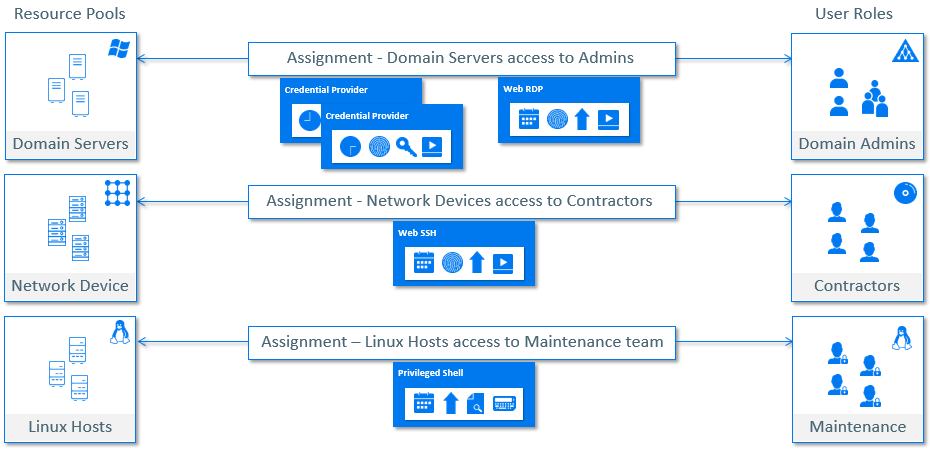
Permissions
Under an assignment, one or more permissions define the access criteria such as Privilege Level, Allowed Access time, Monitoring options, File or Folder access control, Customization etc. Below is the list of permissions based on the Resource Types.
Windows Agents
-
Credential Provider
-
Direct RDP
-
Web Agent RDP
-
Privileged Applications
UNIX Agents
-
Privileged Shell
-
Login Shell
-
Privileged Commands
SSH Servers
-
Terminal SSH
-
Web SSH
Telnet Servers
-
Terminal Telnet
-
Web Telnet
Windows Servers
-
Web RDP
Each permission can have different options, based on Resource Type and mode of access.
Database Servers
-
Oracle Database Access
-
Oracle Database Credentials
-
Microsoft SQL Server Database Access
-
Microsoft SQL Server Database Credentials
-
MySQL Database Access
-
MySQL Database Credentials
-
Sybase Database Access
-
Sybase Database Credentials
-
PostgreSQL Database Access
-
PostgreSQL Database Credentials
-
MariaDB Database Access
-
MariaDB Database Credentials
-
IBM DB2 Database Access
-
IBM DB2 Database Credentials
Applications
-
Applications
-
Application SSO
Keys
-
SSH Keys
-
Windows Keys
-
VMWare Keys
-
Custom Keys
Privilege Elevation
-
Default – Default Privileges selected for Resource in Resource Pool
-
Submit User – No Elevation of Privileges
-
Common Run User or Common Credential – A Common privilege for all the Resources authorized through this permission
-
Custom Run User or Custom Credential – Custom Credentials per Resource
Time Restrictions
-
All Days – 24 hours and 7 days access
-
Time Range – Selecting a specific start time and end time, recurring every week
-
Custom – A recurring time slot for each selected day
NOTE:If a Permission is defined for All Days which is 24 hours and 7 days, another permission of same type is not allowed under an assignment.
NOTE:The time specified is always treated as GMT.
Access and Monitoring Options
-
Session Capture – Capture Key Strokes and Low level audits
-
X11 – Applicable for Terminal SSH only
-
Video Capture – Capture Videos
-
Video FPS – Frames Per Second to use while capturing Videos
-
Secondary Authentication – Move the slider to the left if you do not want this option to be enabled. By default, this option is set to enabled. To use this, ensure that Netiq Advanced Authentication is enabled. This setting ensures that the users are prompted for secondary authentication to log in to the Administration Console.
-
User Message – Display a message to the Users while accessing the session authorized by this permission. This is applicable for selected permissions only
-
Shell Options – Applicable for UNIX Agent permissions, to change the shell behavior
NOTE:Low Level Audits, also called as Command Audits are applicable only for Agents.
Enhanced Access Control
Administrators can enforce access restrictions on files, folders or executables in Agents, by defining the allowed operations such as read, write, delete and execute.
NOTE:Unless the user logs off and logs in again, the EAC Policy is not effective. Non-English characters are not supported with Enhanced Access Control on Windows.
Command Lists
Command Lists are useful to allow/deny access on specific commands or applications within privileged sessions.
-
On Agents, Privileged Applications/Privileged Commands permissions can be configured using Command Lists, to allow privileged access to specific applications or commands, rather than providing a complete privileged session.
-
On Agent-less scenarios, Command Lists are helpful to allow or deny specific commands within privileged sessions.
Customization
Administrators can add Perl scripts to permissions, to customize the behavior of the permission before authorizing the privileged access. For example, a script added in the permission can verify a user’s attribute such as location or department, before authorizing the access.
Figure 6-1 Overview of Privileged Access Permissions