2.2 Configuring High Availability
To configure high availability, you must do the following:
-
Install and register the agents to the manager.
-
Define the domain.
-
(Conditional) Promote the backup manager when primary fails. To write configuration changes, you must first try to get the primary up again. If you are unable to get the primary up again, you can promote the backup manager.
To configure high availability:
-
Install and register the PAM managers:
-
Install a PAM manager.
The first manager you install is defined as the primary manager by default, and its packages are defined as primary. Manager packages on all other manager hosts act as backups.
-
Install another Privileged Account Manager manager.
For more information about installing Privileged Account Manager managers, see Installing the Framework Manager in the Privileged Account Manager Installation Guide.
-
Register the second PAM manager you installed to the Privileged Account Manager instance you installed first. After you register, the second PAM manager acts as a backup manager.
-
-
To define the domain:
-
Login to Privileged Account Manager administrator console.
-
On the home page of the console, click > .
-
Specify a domain name.
-
Click .
-
To add managers and agents to the domain, drag and drop the managers and agents from the list to the domain.
You can have multiple domains in Privileged Account Manager. If you have multiple domains, you can add a backup manager in every domain. So, any request from the agent can be processed by the manager in their domain.
-
-
(Conditional) To promote a backup when the primary fails:
-
Select a host from .
-
Click .
The column indicates whether the status of a module is primary or backup.
-
To promote a backup manager:
-
Ensure that the registry manager package is promoted to primary.
-
Select the required backup packages and click .
-
-
2.2.1 Load Balancing
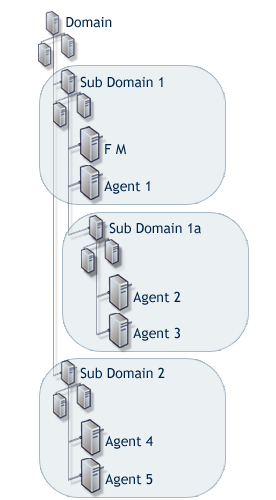
The load balancing feature work by using a hierarchical view of the hosts associated with the Framework.
The hierarchy of hosts is created by using the Hosts console to group hosts into domains and subdomains, which are representative of your enterprise network structure. This effectively gives them a chain of command, where they always address requests to managers in their immediate subdomain before moving along a branch to another subdomain or parent domain.
To achieve an effective load balancing environment, at least two Framework Manager packages must be deployed across the same Framework. The licensing model is not based on how many managers or agents are deployed, but how many hosts the Framework is deployed on. This means that there are no restrictions on how many Framework Manager packages you can deploy.
The Registry Manager controls a database that records the location and status of each package deployed on each of the hosts within the Framework. A copy of this information is held at each host by the Registry Agent package that is included as part of the agent installation. The distributed information is used to calculate the route to the appropriate manager for requests from any agent registered on the Framework. The structure of the registry data enables each host to determine which Framework Manager on the Framework should be the target of requests, and which Framework Manager to use if there is a failure or withdrawal of the initially selected Framework Manager.
Load balancing means the ability to evenly distribute processing and communications activity across the Framework so that no single Framework Manager is overwhelmed by agent requests.
Load balancing is particularly important in situations where it is difficult to predict the number of requests that are directed to a specific category of manager.
The Framework automatically replicates data from the defined primary manager to each additional manager that is deployed in the Framework. Replication takes place automatically when the manager is initially deployed and then again at any stage when the data on the primary manager is modified.
The following packages can be load balanced:
-
Registry Manager: Maintains a database of all hosts and modules and provides certificate-based registration features for the hosts.
-
Package Manager: Manages a repository for packages.
-
Administration Agent: Provides the functionality for the Web-based user interface. Consoles can be installed on the Administration Agent and used to control product features.
-
Access Manager: Maintains a list of Framework user accounts and provides authentication services for the Framework. This package must be installed with a local Registry Manager in order to create a secure user authentication token.
-
Command Control Manager: Maintains a database of all defined command control rules, commands, and scripts.
Table 2-2 Creating a Load Balancing Environment
|
This diagram is an example of a typical way to create an effective load-balanced environment. Deployment: Deploy the Command Control Manager package on the Framework Manager, Agent 2, and Agent 4. Who authenticates to whom: By default, each agent contacts the following host for Command Control authorization:
Example of load balancing working with failover:
|