Scenario 1
Consider the following scenario:
-
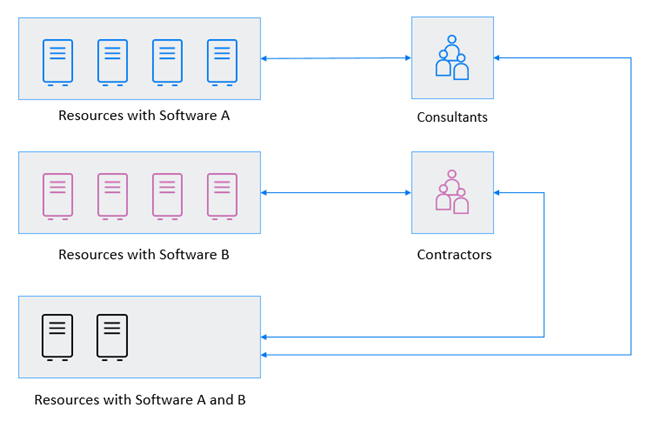
An organization contains two user roles named consultants and contractors, need access on ten resources
-
Consultants role need access on four resources where software A installed
-
Contractors role need access on four resources where software B installed.
-
Both roles need access on two shared resources where both software A and B are installed.
Steps to provide privileged access in this scenario:
Resource Pools
-
Create a Resource Pool (A) with four Resources where software A is installed.
-
Create a Resource Pool (B) with four Resources where software B is installed.
-
Create a Resource Pool (AB) with two Resources where both software A and B are installed.
User Roles
-
Create a User Role – Consultants and include the required users
-
Create a User Role – Contractors and include the required users
Assignments and Permissions
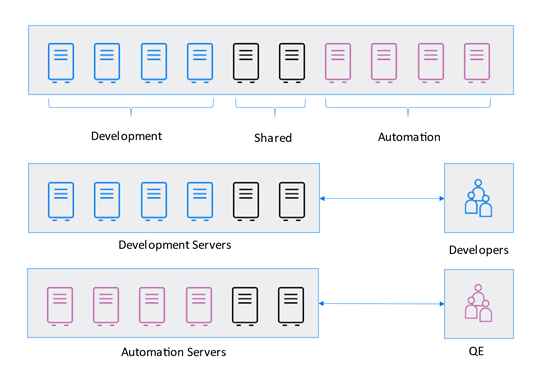
Consider a scenario where you need access to shared resources. You can configure a resource pool which overlaps one or more resource pool. For example. It there is a development and an automation resource pool, wherein development servers/resources are accessed by the developers and automation servers/resources are accessed by quality analysts. The overlapping or shared permission scenario is where there is a possibility of both developers and quality analysts accessing a share resource pool which have a mix of both development and automation servers/resources.
-
Create an assignment between Resource Pool A and Consultants and define required permissions.
-
Create an assignment between Resource Pool B and Contractors and define required permissions.
-
Create an assignment between Resource Pool AB and Consultants and define required permissions.
-
Create an assignment between Resource Pool AB and Contractors and define required permissions.
Figure 7-2 Usage Scenario Permissions