3.2 Determining When to Use the Remote Loader
You can install the engine, Identity Vault, and the driver shim on the same server. The engine runs as part of an OpenText eDirectory process. The OpenText Identity Manager drivers can run on the server with the OpenText Identity Manager. They also can run as part of the same process as the engine. However, in the following scenarios, you might want the driver to run as a separate process on the server that hosts the engine:
-
To protect the Identity Vault from any exceptions encountered by the driver shim.
-
To improve the performance of the server running the engine, by offloading driver commands to the remote application or database.
-
To run additional drivers on servers that do not host the engine.
In these scenarios, the Remote Loader provides a communication channel between the engine and the driver. For example, you install an LDAP driver on the same server as the engine and the Identity Vault. Then you install the Active Directory (AD) driver on a different server with the Remote Loader. To allow the drivers to access the application and communicate with the Identity Vault, install the Remote Loader on both servers, as shown in the following figure.
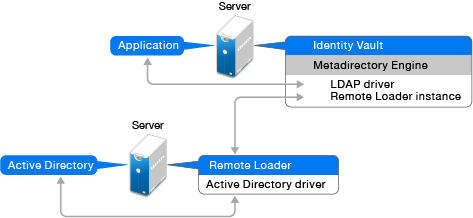
We recommend that you use the Remote Loader configuration for use with your drivers where possible. Use the Remote Loader even in cases where the application is on the same server as the engine.