3.8 Working With Enrollment
3.8.1 About Enroll Process
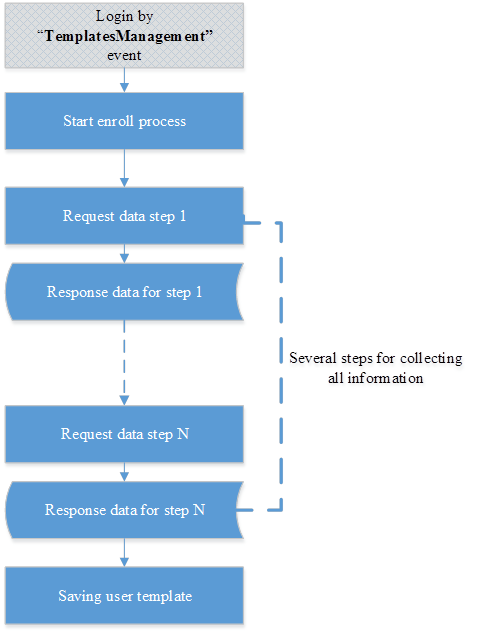
The enrollment process collects information for creating of user templates. User templates can be created by several steps with the enroll process. The enroll process is wizard to user templates. Each user can create user templates into enroll process, administrator can assign enroll process results to another users. For starting the enrollment process the user should be authenticated in the “TemplatesManagement” event. Enroll process can be described by the following chart; it has several steps for collection information from user and saving the user template.
Figure 3-4 Detailed enrollment process chart.
3.8.2 Start Enroll Process
For starting enroll process you should make request to create process to resource with URI:
/enroll
Resource provided by HTTP POST and accepted JSON object with this parameters:
Table 3-36 Parameters for starting enroll process.
|
Parameter name |
Description |
|---|---|
|
login_session_id |
Login session identifier, user should be logged to “TemplatesManagement” for creating enroll process. |
|
method_id |
Authentication method identifier. Identifier of method form authentication methods list that supports by server. |
Resource returns enroll process identifier, it is represented as JSON object with this parameter.
Table 3-37 JSON-object for started enroll process.
|
Parameter name |
Description |
|---|---|
|
enroll_process_id |
Enroll process identifier, this identifier will be used in next enroll process step. |
Example
On the following example user with login session identifier “Iz4awDMiRYcZh55SYt8awBz3Fcl1vikJ” starts the enroll process for the security question authentication method.
HTTP POST
https://authserver.example.com/api/v1/enroll
Request
{
"method_id":"SECQUEST:1",
"login_session_id":"Iz4awDMiRYcZh55SYt8awBz3Fcl1vikJ"
}
Response
{
"enroll_process_id":"WqQd4TwxPCz7q1tAKrWGzCtajg7Iav14"
}
3.8.3 Providing Data Into Enroll Process
You should provide data into enroll process after this process is started. Resource for providing data has URI:
enroll/{enroll_process_id}/do_enroll
Resource provided by HTTP POST and has this parameter.
Table 3-38 URI parameter for providing data into enroll process.
|
URI parameter |
Description |
|---|---|
|
enroll_process_id |
Enroll process identifier, identifier of current enroll process. Start enroll process to get this identifier. |
Resource accepts JSON object.
Table 3-39 Parameter for providing data into enroll process.
|
Parameter name |
Description |
|---|---|
|
login_session_id |
Login session identifier, user should be logged to “TemplatesManagement” for providing enroll data. |
|
response |
Object with specific data for method. Data varies for each authentication method. Check method description for more information. |
Resource returns the result for accepting the enroll data. Result can be different for each authentication method, for more information check description for authentication methods, but all responses contain some parameters which are the same for all authentication methods.
Table 3-40 JSON-object with result for accepting the enroll data.
|
Parameter name |
Description |
|---|---|
|
method_id |
Authentication method identifier. Identifier of method from authentication methods list that is supported by the server. This parameter shows which authentication method currently works with enroll data. |
|
status |
Current status of enroll process, see status description for more information. |
|
msg |
Message from enroll process, this parameter is used for providing more information about enroll process. |
|
reason |
The detailed status of the enrollment process, please check authentication method description for more information. |
Enroll process has the following status
Table 3-41 Enroll process status.
|
Status name |
Description |
|---|---|
|
OK |
This status indicates that the enroll process has collected all necessary data and you can create or update the user template. |
|
MORE_DATA |
This status indicates that enroll process is waiting for more data from user, you should provide specific data to enroll process, for more information about data see description of authentication methods. |
|
FAILED |
This status indicate that the enroll process failed, for more information check message parameter from response. With this status you should start enroll process again. |
Each enroll process is one or more steps for collecting all necessary data for the authentication method, each authentication method has a different number of steps and data, for more information see authentication method description.
Example
On the following example we provide data for security question authentication method, this method has two steps: first step is getting security question list from server, second step is providing answers for each security question. On example we have enroll process with identifier “WqQd4TwxPCz7q1tAKrWGzCtajg7Iav14”, user logged to “TemplatesManagement” application with session identifier “7Ge4BCGDLKPyG5b6Mp7PBcKUsQouhpdX”. On the first step, we will get security question list.
HTTP POST
https://authserver.example.com/api/v1/enroll/WqQd4TwxPCz7q1tAKrWGzCtajg7Iav14/do_enroll
Request
{
"response":{},
"login_session_id":"7Ge4BCGDLKPyG5b6Mp7PBcKUsQouhpdX"
}
Response
{
"questions":
{
"1":"What is your dog name?",
"0": "What is your favorite song?"
},
"method_id":"SECQUEST:1",
"msg":"Waiting for answers...",
"status":"MORE_DATA",
"reason":"SECQUEST_WAITING_ANSWERS"
}
We got question and servers change status to “MORE_DATA”, this means that the server is waiting for the answers to the questions. Now we will send answers, it will be the second step.
HTTP POST
https://authserver.example.com/api/v1/enroll/WqQd4TwxPCz7q1tAKrWGzCtajg7Iav14/do_enroll
Request
{
"response":
{
"answers":
{
"1":"Spotty",
"0":"Yesterday"
}
},
"login_session_id":"7Ge4BCGDLKPyG5b6Mp7PBcKUsQouhpdX"
}
Response
{
"method_id":"SECQUEST:1",
"status":"OK",
"msg":"",
"reason":""
}
After the second step server accepted our data and return status “OK” it means that enrollment was successful.
3.8.4 Delete Enroll Process
You can stop enroll process by resource with URI:
/enroll/{enroll_process_id}?login_session_id={login_session_id}
Resource provided by HTTP DELETE and has these URI parameters.
Table 3-42 URI parameters for stop enroll process.
|
URI parameter name |
Description |
|---|---|
|
enroll_process_id |
Enroll process identifier, identifier of enroll process, which will be stop. |
|
login_session_id |
Login session identifier, user should be logged to “TemplatesManagement” for deleting enroll process. |
This resource does not return any data, if deleting enroll session was successful method return HTTP 200 status.
Example
On the following example a user with login session, identifier “4T1WEpCKumaIonjDBhoXbWkHhGg5Tk7Z” deletes enroll process with identifier “AfAXRqxrI1K2jgeJzrarD0NxllhpY9UW”.
HTTP DELETE
https://authserver.example.com/api/v1/enroll/AfAXRqxrI1K2jgeJzrarD0NxllhpY9UW?login_session_id=4T1WEpCKumaIonjDBhoXbWkHhGg5Tk7Z
Response
HTTP 200